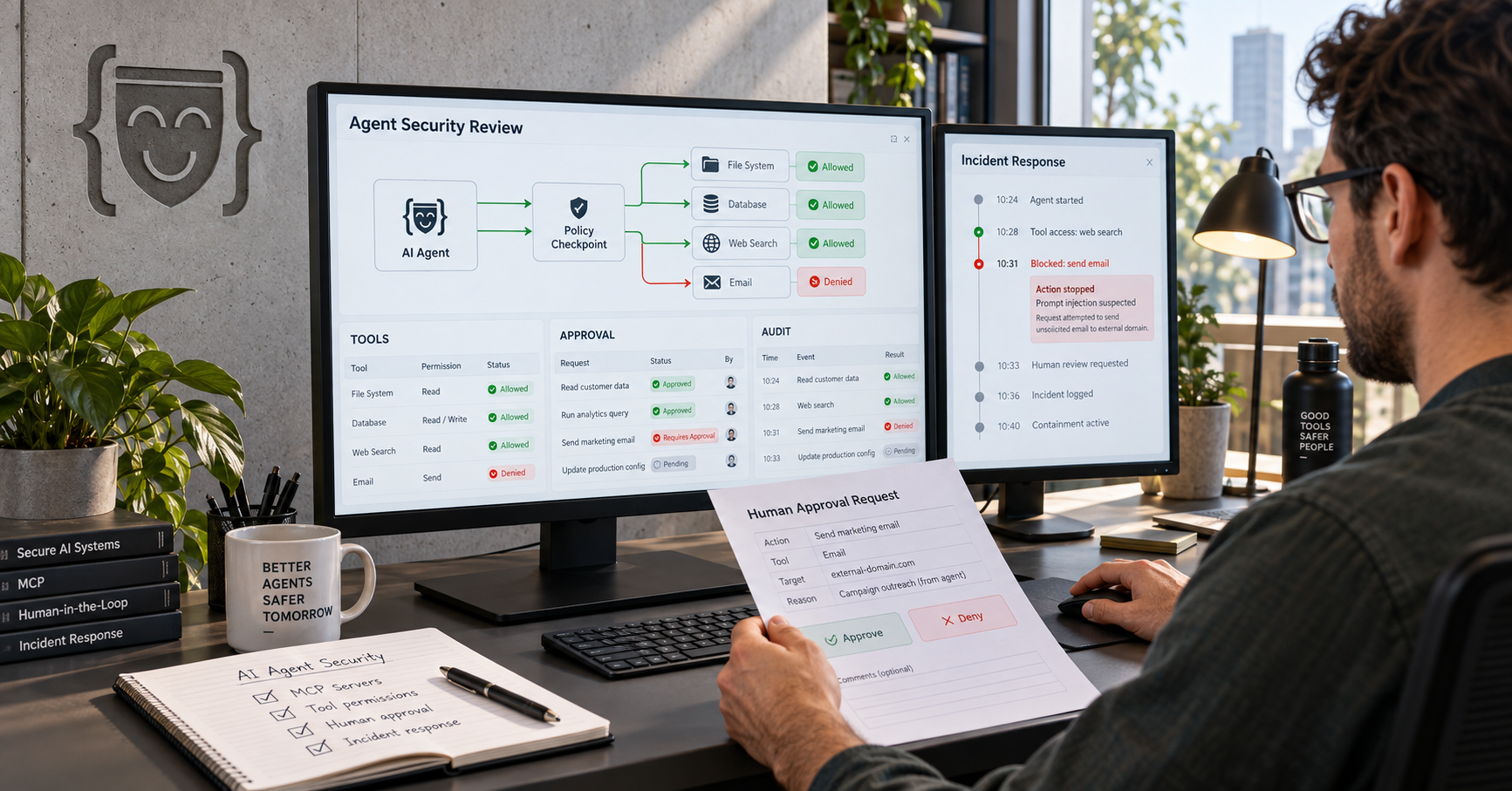
Most AI automation projects do not fail in month nine.
They fail in week one, when a company decides to automate a process nobody has properly mapped, measures success with a vague promise to “save time,” and gives an AI tool access to systems without deciding what it is allowed to do.
The demo can still look impressive. An AI model summarizes an email, extracts a field from a document, drafts a response, or calls a test API. Everyone agrees that it feels useful. Then production begins and the real process appears: duplicate records, conflicting policies, missing data, approval bottlenecks, exceptions, legacy systems, security rules, and the person who quietly fixes every unusual case but was never included in the design.
That is not an AI failure. It is a workflow-design failure.
Business process automation with AI works when a team treats the project as an operating-system improvement, not a chatbot experiment. AI can interpret unstructured information, retrieve approved context, classify requests, extract data, recommend a next step, and draft work. Conventional software still needs to manage identity, permissions, rules, approvals, integrations, state, retries, audit logs, and recovery.
The useful question is not, “Where can we add AI?” It is, “Which recurring business outcome can we improve in a controlled, measurable way within 90 days?”
This roadmap shows how to answer that question. It covers workflow audit, solution design, controlled build, shadow testing, pilot rollout, human approval, cost, ROI, and the evidence required before a business scales automation further.
Executive Summary
A disciplined 90-day AI automation programme should produce one of two results:
- A controlled workflow that measurably improves a business outcome and is ready to scale.
- Clear evidence that the workflow is not ready, plus a practical plan to fix process, data, ownership, or integration gaps first.
The roadmap is simple in principle:
- Audit the real workflow before selecting technology.
- Establish the baseline, owner, source of truth, risks, and desired business outcome.
- Score the opportunity and choose the smallest workflow that can prove value.
- Define what AI may interpret, what deterministic software must enforce, and where people must approve.
- Build with narrow permissions, test cases, exception handling, and a rollback path.
- Run in shadow mode before the system changes production data or customer experience.
- Pilot the workflow with a controlled group and measure quality, economics, and reviewer effort.
- Scale only when the evidence supports it.
For the wider opportunity set, start with AI Workflow Automation for Businesses: 15 High-ROI Use Cases, Cost, and ROI in 2026. This article answers the next question: how to move from an opportunity list to a production-ready first workflow.
What AI Business Process Automation Actually Means
AI business process automation combines AI capabilities with conventional workflow software to move a defined business task from trigger to outcome.
The AI component can work with messy inputs: emails, PDFs, chat transcripts, forms, images, contracts, CRM notes, and knowledge-base articles. It can classify, extract, summarize, retrieve, compare, recommend, and draft. The surrounding application controls what happens next.
For example, an incoming invoice workflow may:
- Receive an invoice through email or upload.
- Extract vendor, amount, purchase-order, tax, and line-item data.
- Check duplicate status and match approved records.
- Apply deterministic approval limits and validation rules.
- Route mismatches to a human reviewer with evidence.
- Create an approved draft in the accounting system.
- Record every decision, correction, approval, and outcome.
That is a business process. It is not a prompt.
The division of responsibility that prevents expensive mistakes
| Work type | Best owner | Why |
|---|---|---|
| Classifying a messy request or extracting information from a document | AI with validation | Interpretation is valuable when inputs are unstructured. |
| Calculating a total, applying a threshold, checking a permission, or enforcing a policy | Deterministic software | Rules must be predictable, testable, and auditable. |
| Approving a refund, payment, legal term, access change, or sensitive disclosure | Named human plus policy controls | The consequence is too high for unbounded autonomy. |
| Moving data through a stable API or triggering a known action | Workflow automation | This work is usually cheaper and more reliable without model judgment. |
| Operating a legacy screen where no API exists | RPA with monitoring and a migration plan | RPA can bridge a gap, but should not become the permanent architecture by accident. |
If a team begins with the technology rather than the responsibility model, it often overuses AI where a rule would be better and under-designs the places where human judgment is essential. For a deeper comparison, see AI Agent vs Chatbot vs Copilot vs RPA: Which Automation Does Your Business Actually Need?.
Why Use a 90-Day Roadmap?
Ninety days is long enough to observe a workflow under real operating conditions and short enough to preserve focus. It discourages two expensive behaviours:
- Building a giant platform before proving one workflow has value.
- Running a “pilot” so loose that nobody can tell whether it succeeded.
The aim is not to promise that every process will be fully autonomous in 90 days. Complex, regulated, high-volume, or deeply integrated workflows may need more time. The aim is to create a decision-quality result: a tested first workflow, a measured business case, a risk model, and a credible next-step plan.
The 90-day outcome contract
By day 90, the executive sponsor should be able to answer these seven questions without guessing:
- Which workflow was improved and who owns it?
- What did the process cost, take, and produce before automation?
- What can the system do on its own, and what requires approval?
- Which systems, documents, APIs, and people are involved?
- How accurate, reliable, and safe is the workflow under normal and abnormal conditions?
- What value has been measured, not merely estimated?
- Should the organisation scale, correct, pause, or stop this workflow?
That is the standard. A slide saying “AI pilot completed” is not a result.
Before Day 1: Pass the Workflow-to-ROI Gate
Do not spend the first month selecting models. Spend it confirming the project deserves to exist.
Boxinall can use a Workflow-to-ROI Gate as a practical decision tool before committing build time. It is not a claim of a proprietary platform. It is a way to make the underlying business case visible.
The eight questions
| Question | A healthy answer | Warning sign |
|---|---|---|
| Is the work frequent enough? | It occurs daily or at meaningful monthly volume. | It happens rarely and has no reusable pattern. |
| Is there a painful manual burden? | People repeatedly read, copy, classify, search, compare, route, or chase. | The perceived problem is only anecdotal. |
| Is the desired outcome measurable? | Time, errors, cash cycle, conversion, SLA, or capacity can be baselined. | Success is described as “better AI” or “more innovation.” |
| Is there one accountable business owner? | A leader owns process decisions and exceptions. | Multiple teams disagree about who decides. |
| Are source systems and policies known? | The data source, freshness, access, and record owner are clear. | Facts live in disconnected spreadsheets or personal inboxes. |
| Can the system act safely? | Approved APIs, workflows, or drafts exist with rollback paths. | The only path is unrestricted database access or brittle manual workarounds. |
| Are exceptions understood? | The team can name common exceptions and escalation owners. | “We will let the AI handle edge cases” is the answer. |
| Is the risk proportional to the first release? | Early actions are reversible and bounded. | The first version sends payments, deletes data, changes access, or makes legal commitments. |
Score each question from 0 to 5. A score of 30 or higher is usually a strong proof-of-value candidate. A score of 20 to 29 may be viable after process or data preparation. Below 20, fix the process before introducing AI.
Boxinall Experience Note: A weak score is useful information. It can prevent a company from turning unclear work into a faster, more expensive form of confusion.
Days 1 to 15: Audit the Workflow You Actually Have
The first phase is not a strategy workshop filled with generic process diagrams. It is a structured investigation into how work moves today.
1. Map the current workflow, including the uncomfortable parts
Document the workflow from trigger to outcome:
- What starts the process?
- Which person or system performs each step?
- What information is used at each step?
- Which system is authoritative for each fact?
- Where do people wait, re-enter data, request clarification, or make a judgment call?
- What happens when data is missing, policy is unclear, or a customer does not fit the normal path?
- Which actions are irreversible or externally visible?
Do not accept the idealised SOP as the complete answer. Watch a sample of real work. Ask the person who resolves failures, not only the person who owns the documentation. Compare system logs with what people say happens.
2. Create a Workflow Reality Map
Most vendors draw a clean future-state workflow before understanding the current state. Boxinall can add a Workflow Reality Map instead.
It should show four layers at once:
| Layer | What it reveals |
|---|---|
| Official process | The documented sequence and policy. |
| Actual process | The workarounds, re-entry, personal spreadsheets, inboxes, and unofficial handoffs. |
| Exception process | The cases that break the normal flow and the people who rescue them. |
| Evidence process | Where baseline data, decisions, approvals, and outcomes can be measured. |
This distinction matters because the automation must be designed for reality, not a diagram that only works on a good day.
3. Establish the baseline before changing anything
Record a baseline for at least enough real cases to understand normal variation. The exact period depends on volume. A workflow with thousands of cases each month may produce useful evidence quickly; a monthly process may require longer observation.
At minimum, capture:
- Monthly volume and peak-volume periods.
- Handling time, wait time, and total cycle time.
- Error, rework, escalation, and abandonment rates.
- Cost of manual effort using loaded labour cost, not only salary.
- Customer, supplier, employee, or internal-user impact.
- Revenue, cash-flow, recovery, or service-level effect where defensible.
- Exception types, frequency, owners, and resolution time.
If the baseline is weak, every later ROI number will be weak too.
4. Identify the first safe slice
The first release should target a bounded part of the workflow, not every variation. For example:
- Support: classify and prepare responses for standard policy questions before giving the system authority to issue refunds.
- Sales: enrich and route inbound leads before allowing autonomous outreach.
- Finance: extract and validate low-risk invoices before writing payment instructions.
- HR: draft onboarding checklists before changing employee records.
The best first slice is frequent, low-risk, reversible, and measurable. It gives the organisation a chance to learn without giving a new system too much authority.
Days 16 to 30: Design the Blueprint Before You Build
The second phase turns the audit into a buildable, governable design. It should produce a business and technical agreement, not a vague requirements document.
The Boxinall Automation Contract
Create a one-page Automation Contract for the selected workflow. This makes the important decisions explicit before anyone begins wiring systems together.
| Contract field | What it must state |
|---|---|
| Business outcome | The metric the workflow must improve. |
| Scope | The cases included in version one and the cases deliberately excluded. |
| Trigger | What initiates the workflow. |
| Source of truth | The authoritative systems, documents, policies, and data owners. |
| AI responsibility | What AI may classify, extract, retrieve, summarize, recommend, or draft. |
| Deterministic responsibility | Which rules, thresholds, calculations, permissions, and validations are enforced in software. |
| Allowed actions | What the system may do automatically. |
| Prohibited actions | What the system must never do. |
| Approval policy | Which actions need review, by whom, within what time, and with what escalation path. |
| Exception route | What happens when confidence is low, records disagree, or tools fail. |
| Recovery path | How the workflow retries, reconciles, reverses, or hands work back to people. |
| Success measures | The quality, economic, workflow, and risk metrics used to judge the result. |
| Ownership | Named owners for business process, data, technology, security, and ongoing policy. |
Boxinall Experience Note: If a workflow cannot fit into a clear Automation Contract, it is usually still a business conversation, not a build-ready system.
Choose the correct automation pattern
Not every process needs an AI agent. Picking the smallest reliable design protects cost, delivery time, and user trust.
| Need | Recommended pattern | Example |
|---|---|---|
| Stable rules with known fields | Conventional workflow automation | Create a task when a contract reaches renewal date. |
| Screen-based work with no API | RPA with monitoring | Copy validated data into a legacy system while an API plan is developed. |
| Messy documents, emails, or conversations | AI within a controlled workflow | Classify an email, extract a request, and route it with policy checks. |
| A person needs faster context and drafting support | Copilot or review queue | Prepare a support answer with sources for an agent to approve. |
| Bounded multi-step work across approved tools | AI agent with orchestration | Gather evidence, prepare an approved CRM update, and request human approval. |
| Financial, legal, access, deletion, or sensitive actions | Deterministic controls plus human approval | Validate a refund request but require a named approver to issue it. |
For architecture guidance when several specialised agents are required, see The Boxinall Blueprint for Production-Ready Multi-Agent AI Systems. Do not add multiple agents merely because the diagram looks advanced.
Design the human-approval model early
Human approval is not a checkbox. It is part of the workflow experience.
AWS recommends a risk-tiered model: routing every action through a reviewer creates rubber-stamp fatigue, while routing none creates unbounded autonomy. High-impact decisions should come with enough context for the reviewer to make a real decision, and approval actions should be logged with identity, timestamp, and escalation behaviour. AWS human-in-the-loop guidance makes the same practical case.
Use a simple autonomy ladder:
| Level | System behaviour | Appropriate example |
|---|---|---|
| 0. Observe | Records what it would do, but changes nothing. | Compare proposed support routing with actual routing. |
| 1. Recommend | Suggests a next step to a person. | Recommend an exception reason for an invoice. |
| 2. Draft | Creates reversible work for review. | Draft a CRM update, email, or purchase request. |
| 3. Act with approval | Executes only after a named reviewer approves. | Send an external customer reply or create an approved accounting record. |
| 4. Bounded autonomy | Acts within explicit limits and continuous monitoring. | Resolve a standard, low-risk request with a policy-compliant response. |
Payments, data deletion, security access, legal commitments, sensitive disclosures, and high-value commercial changes should be prohibited or require stronger human review. A model prompt is not a sufficient control.
Create a Decision Trace Map
Boxinall can add a Decision Trace Map to make AI behaviour reviewable by non-technical stakeholders. For each decision or action, record:
- The trigger and incoming data.
- The approved context or source records used.
- The model task and required output schema.
- The deterministic checks applied after the model output.
- The permitted tools and least-privilege access scope.
- The approval tier and reviewer experience.
- The audit record, fallback, and rollback path.
This is more useful than a generic architecture diagram because it lets operations, security, compliance, and engineering examine the same decision from their own angle.
Days 31 to 45: Build the Controlled First Version
The first build should be intentionally narrow. The objective is not to create a universal automation platform. It is to build enough durable capability to test the chosen workflow safely.
A reference architecture that is safe to operate
Trigger: Form | Email | Ticket | Document | Scheduled Event
                         |
              Identity and API Gateway
                         |
      Workflow Orchestrator and Durable State
          /              |                \
  AI Understanding   Rules and Policy    Human Approval
          \              |                /
           Tool and Integration Gateway
                         |
CRM | ERP | Help Desk | Documents | Databases | Messaging

Across all layers:
Permissions | Audit Trail | Evaluation | Cost Controls | Monitoring | Recovery
What each layer must do
- Trigger and intake: Create a traceable workflow ID, record source, capture the original input, and reject malformed or unauthorised requests.
- Orchestration and state: Preserve workflow state, manage retries, timeouts, queues, pauses, and idempotency. A second event must not create a duplicate external action.
- AI understanding: Extract, classify, retrieve, summarise, or recommend within a defined schema. Give the model only the context needed for the task.
- Rules and policy: Enforce approval limits, data retention, ownership, access rights, pricing rules, and prohibited actions outside the model.
- Tool and integration gateway: Expose narrow validated operations, such as
create_draft_customer_reply(ticket_id), instead of giving an agent unrestricted CRM, ERP, or database access. - Human approval: Present the proposed action, evidence, risks, and relevant choices in a decision-ready interface.
- Observability and evaluation: Capture traces, model version, retrieval sources, tool calls, approval decisions, errors, cost, and final business outcome.
Microsoft’s current guidance on autonomous agentic AI reinforces the need for least privilege, deterministic guardrails, named identities, monitoring, and meaningful human oversight. The agent-risk guidance and least-privilege guidance are useful reference points.
Do not let context become a hidden liability
Good AI automation uses context from approved systems. It does not treat every document, email, retrieval result, or web page as an instruction.
Apply these principles:
- Keep CRM, ERP, help-desk, HR, and transaction systems as the source of truth.
- Retrieve approved knowledge with document provenance, access scope, and freshness information.
- Treat external and user-supplied content as data, not commands.
- Validate model outputs against a schema before another system acts.
- Minimise data sent to models and tools.
- Use unique, revocable, least-privilege identities for workflow components.
- Log the evidence behind an action, not private model reasoning traces.
The real model cost is usually smaller than the work of building this safe perimeter. That is why a cheap proof of concept can become an expensive production programme if integration, permissions, exception design, and observability are postponed.
Days 46 to 60: Test in Shadow Mode and Try to Break It
The most mature early release is often one that cannot yet change anything.
In shadow mode, the system receives real or representative work, produces its proposed decision or draft, and records what it would have done. A person or existing process still makes the actual decision. The team then compares the two.
What to measure in shadow mode
| Measure | Why it matters |
|---|---|
| Correct classification, extraction, or recommendation rate | Tests the task the AI is supposed to perform. |
| Policy-compliance rate | Confirms that outputs respect deterministic rules and boundaries. |
| False-approval and false-escalation rate | Reveals whether risk thresholds are too loose or too strict. |
| Evidence quality | Shows whether reviewers can see the right source records and rationale. |
| Exception coverage | Exposes cases that have no owner or recovery path. |
| Reviewer correction time | Prevents a system from shifting work rather than removing it. |
| Cost per case | Connects model, retrieval, and tool usage to operational value. |
Build a golden test set, not just a happy-path demo
A useful test set includes:
- Common, ordinary cases.
- Missing data and low-quality documents.
- Conflicting records between systems.
- Duplicate events and retry conditions.
- Stale or contradictory policy sources.
- High-risk transactions or unusual amounts.
- Malicious or irrelevant instructions embedded in user content.
- Failed tools, unavailable systems, and expired credentials.
- Delayed, rejected, or unavailable approvers.
- Records that must be routed to a human immediately.
The Boxinall Rollback Drill
Most AI proposals mention a rollback path. Fewer teams test one before launch.
Boxinall can run a Rollback Drill during shadow mode: deliberately simulate a failed API call, duplicate trigger, wrong data source, unavailable approver, invalid model response, and policy breach. For each case, verify four things:
- The system stops or degrades safely.
- No irreversible action occurs without the required approval.
- The right person receives an understandable exception.
- The workflow can reconcile state and resume without hidden manual cleanup.
This is an unexpected but valuable addition because it converts “we have a kill switch” from a slide claim into an operational capability.
Test the economics as seriously as the model
A workflow can be technically accurate and still economically weak. During shadow mode, track actual task volume, time saved per accepted result, reviewer time, exception rate, model and infrastructure cost, and rework. The goal is to understand whether automation is reducing total work, not simply moving it from an operations queue to an approval queue.
Days 61 to 75: Pilot with Real Users and Controlled Authority
After shadow mode shows reliable performance, pilot with a constrained user group, workflow segment, or autonomy level.
Start with reversible actions
Useful pilot actions include:
- Drafting a support reply with approved sources.
- Creating a CRM task or pre-populated note.
- Routing an invoice exception to the correct reviewer.
- Preparing an onboarding checklist.
- Enriching and assigning an inbound lead for human review.
Avoid starting with direct payments, account deletion, employee decisions, security access, contract commitments, or customer-facing promises without a stronger approval design.
Give reviewers a Human Approval Packet
Approval is only useful when a reviewer can decide quickly and confidently. Boxinall can design a Human Approval Packet containing:
- The proposed action in plain language.
- The source records and citations used.
- Relevant policy, threshold, or risk flags.
- What will happen if approved.
- What the workflow will do if rejected, revised, or timed out.
- Approve, revise, reject, escalate, and defer options.
- An audit trail with reviewer identity, timestamp, and reason.
This is far better than asking a manager to approve an opaque model output in email or chat.
Watch for the three pilot failures
- Rubber-stamp approval: Reviewers approve everything because the packet is unclear, the queue is too large, or they assume the system is right.
- Exception pile-up: The system cannot resolve enough normal cases, so it creates a new backlog rather than removing one.
- Invisible quality decline: The workflow is faster but produces lower-quality answers, records, decisions, or customer experience.
Respond by adjusting scope, thresholds, data quality, policy controls, or user experience. Do not respond by simply increasing model autonomy.
Days 76 to 90: Prove ROI and Make the Scale Decision
The final phase should end with evidence, not optimism.
Use an ROI Evidence Ledger
An ROI calculator is useful before build. An ROI Evidence Ledger is what keeps the economics honest after deployment.
| Benefit claim | Baseline source | Owner | Measurement method | Confidence | Actual result |
|---|---|---|---|---|---|
| Capacity released | Time study or system logs | Operations owner | Before-and-after handling minutes | High | Update monthly |
| Rework reduced | QA, finance, or support records | Process owner | Error rate and correction cost | Medium to high | Update monthly |
| Faster cash or conversion | CRM, ERP, or finance data | Revenue or finance owner | Controlled comparison where possible | Medium | Update monthly |
| Customer or employee impact | CSAT, SLA, retention, or service data | CX or HR owner | Trend plus review of counter-signals | Medium | Update quarterly |
| Risk reduction | Audit, compliance, or incident records | Risk owner | Exception and policy-violation tracking | Medium | Update quarterly |
The ledger forces a business to say where each number came from, who owns it, and how much confidence it deserves. It stops teams from counting every saved minute as cash or every faster task as guaranteed revenue.
A practical ROI formula
Monthly gross benefit =
(Hours avoided x loaded hourly cost)
+ Error and rework cost avoided
+ Measurable cycle-time or cash-flow benefit
+ Defensible revenue or retention impact

Monthly net benefit =
Monthly gross benefit - monthly operating cost

First-year ROI (%) =
(Annual gross benefit - first-year total cost)
/ first-year total cost x 100

Payback period (months) =
Initial implementation cost / monthly net benefit
Illustrative example
Assume a business automates a high-volume internal request workflow with 2,500 monthly cases. After review and exception handling, it saves nine minutes per case.
| Item | Assumption | Monthly value |
|---|---|---|
| Capacity released | 375 hours x USD 27 loaded hourly cost | USD 10,125 |
| Error and rework avoided | Measured against the current baseline | USD 2,000 |
| Faster cycle-time benefit | Attributable and defensible value only | USD 2,500 |
| Gross monthly benefit | USD 14,625 | |
| Ongoing operation | Models, cloud, monitoring, support, maintenance | USD 3,500 |
| Net monthly benefit | USD 11,125 |
With a USD 45,000 initial implementation cost:
- Annual gross benefit: USD 175,500
- First-year total cost: USD 87,000, including 12 months of operation
- First-year net value: USD 88,500
- First-year ROI: approximately 102 percent
- Payback period on the initial build: approximately four months
This is an illustration, not a promise. Substitute actual task volume, accepted time savings, loaded labour cost, exception rate, rework cost, and operating cost. A model that is impressive in a demo is not automatically a profitable workflow.
Make a visible scale decision
At day 90, use a simple decision table.
| Decision | Evidence required |
|---|---|
| Scale | Quality meets the acceptance threshold, economics are positive, controls work, users accept the workflow, and ownership is clear. |
| Improve then extend | The core use case works, but data quality, exception handling, reviewer experience, or integration reliability needs correction. |
| Hold | The workflow is useful but value, risk, or cost is not yet clear enough to justify expansion. |
| Stop or redesign | The process lacks stable ownership, data, measurable value, or a safe operating model. |
Stopping a weak project is not failure. Scaling a weak project because it has an AI label is failure with a larger bill.
The 90-Day Plan at a Glance
| Time | Primary focus | Concrete outputs | Executive question answered |
|---|---|---|---|
| Days 1-15 | Audit and baseline | Workflow Reality Map, baseline metrics, FlowScore, risk register | Is this workflow worth automating first? |
| Days 16-30 | Blueprint and controls | Automation Contract, Decision Trace Map, architecture, approval policy, ROI hypothesis | What exactly will be built, and how will it be controlled? |
| Days 31-45 | Controlled build | Working workflow, narrow integrations, review interface, runbook, test plan | Can the core workflow operate safely? |
| Days 46-60 | Shadow test and rollback | Golden test set, evaluation results, Rollback Drill evidence, corrected thresholds | Is the system accurate, recoverable, and economically plausible? |
| Days 61-75 | Pilot | Limited production cohort, Human Approval Packet, user feedback, operations dashboard | Does it improve real work without creating hidden cost or risk? |
| Days 76-90 | ROI and scale decision | ROI Evidence Ledger, outcome review, scale or redesign plan | Should the company invest further? |
Cost: What Should a 90-Day Programme Include?
No responsible partner can quote a fixed price without understanding the workflow, systems, volume, risk, and required controls. The following are indicative planning ranges, not a Boxinall quotation.
| Delivery scope | Typical work included | Indicative investment |
|---|---|---|
| Workflow audit and blueprint | Process mapping, data and integration review, FlowScore, architecture, risk and ROI baseline | USD 3,000 to 10,000 |
| Controlled proof of value | One narrow workflow, limited integrations, evaluation set, review queue, shadow mode | USD 12,000 to 35,000 |
| 90-day production pilot | Durable orchestration, core integrations, approval UX, observability, security, pilot support, ROI review | USD 30,000 to 90,000 |
| Ongoing operation | Model use, cloud, tools, evaluation, monitoring, maintenance, and support | USD 1,500 to 20,000+ per month |
The major cost drivers are not just model tokens. They include data preparation, integration quality, scope of actions, approval and exception design, security requirements, user experience, availability, test coverage, and support expectations.
For fuller cost and use-case context, see AI Workflow Automation for Businesses.
Three Examples of a 90-Day First Workflow
Example 1: Inbound sales response and CRM hygiene
Audit: Measure inbound lead volume, response time, duplicate records, qualification effort, routing accuracy, and follow-up gaps.
First safe slice: Enrich and classify inbound leads, draft a tailored first response, and create a CRM task for human review.
Do not automate yet: Unlimited outbound messaging, pricing promises, contract commitments, or automatic pipeline-stage changes without approval.
Day-90 evidence: Lead-response time, qualification completeness, accepted routing rate, meeting conversion, sales-rep time released, and opt-out or complaint signals.
Read the deeper implementation guide: How to Build an AI Sales Agent.
Example 2: Customer support triage and response preparation
Audit: Map ticket types, knowledge quality, customer-impact risk, current handoff rules, resolution time, reopen rate, and CRM/help-desk gaps.
First safe slice: Classify standard tickets, retrieve approved content, draft responses with sources, and route sensitive or uncertain cases to people.
Do not automate yet: Refunds, account cancellations, medical or legal advice, policy exceptions, or high-value customer commitments.
Day-90 evidence: Correct classification, answer acceptance, handoff quality, first-response time, reopen rate, CSAT, and reviewer correction time.
Read the deeper implementation guide: How to Build a Customer Support AI Agent.
Example 3: Invoice intake and exception routing
Audit: Measure invoice volume, formats, extraction quality, duplicate risk, PO matching, approval delays, exception categories, and reviewer time.
First safe slice: Extract invoice data, validate basic fields, match authorised records, detect exceptions, and prepare a review packet.
Do not automate yet: Payment release, vendor bank-detail changes, policy overrides, or high-value approval decisions.
Day-90 evidence: Extraction accuracy, touchless low-risk processing, exception rate, duplicate prevention, reviewer minutes per invoice, and end-to-end cycle time.
Read the deeper implementation guide: How to Build an AI Invoice Processing Agent.
The Boxinall Difference: What a Serious Delivery Partner Adds
Many AI vendors can demonstrate an assistant. A serious automation engagement needs to improve a business process that will still be operating after the demo team has left.
For this kind of work, Boxinall can combine custom software development, AI engineering, frontend experience, backend integration, and operational workflow design. That makes it possible to add deliverables many generic AI proposals skip:
- Workflow Reality Map: Captures the official process, actual workarounds, exception paths, and evidence sources before build begins.
- FlowScore and Workflow-to-ROI Gate: Helps leaders choose the first workflow based on value, readiness, risk, reversibility, and measurable outcome rather than excitement.
- Automation Contract: Converts a vague AI idea into a one-page agreement on scope, owners, actions, policies, approvals, and success measures.
- Decision Trace Map: Shows how each AI output, rule, tool call, reviewer action, and fallback is connected and auditable.
- Human Approval Packet: Gives reviewers the evidence and action context they need instead of presenting opaque model output.
- Exception Economy Ledger: Measures the cost, frequency, owner, and delay of exceptions so the team fixes the real bottleneck rather than celebrating a misleading automation percentage.
- Rollback Drill: Tests bad inputs, failed tools, duplicate events, unavailable approvers, and policy breaches before the workflow gets wider authority.
- Shadow-to-Autonomy Scorecard: Requires evidence before moving from observe mode to recommendation, draft, approval, or bounded autonomy.
- 90-Day Outcome Review: Produces a scale, improve, hold, or stop decision backed by quality, risk, adoption, and ROI evidence.
These are not decorative consulting documents. They are the work needed to make an AI workflow maintainable, trusted, and economically defensible.
When You Should Not Automate Yet
Pause and fix the process first when:
- The workflow happens too infrequently to justify the cost.
- The company cannot define a correct outcome or policy.
- Nobody owns the process or exceptions.
- Source data is stale, contradictory, unpermissioned, or inaccessible.
- The required system action cannot be exposed safely.
- The process changes weekly with no stable rules.
- The business cannot measure current cost, delay, quality, or risk.
- The first request is for broad autonomy over payments, access, legal decisions, or sensitive data.
The responsible recommendation is sometimes, “Not yet.” That is not hesitation. It is how a company avoids building an automation that makes a fragile process faster and harder to control.
Governance, Security, and Reliability Are Part of the Roadmap
NIST’s AI Risk Management Framework presents a useful operating lens through the functions Govern, Map, Measure, and Manage. In practice, that means assigning accountability, understanding the workflow context, evaluating risk and performance, and continuously managing what changes after deployment. The NIST AI RMF Core and Playbook are valuable starting points, not a substitute for organisation-specific governance.
For an AI workflow, apply that lens throughout the 90 days:
- Govern: Name owners, establish risk tolerance, define approvals, and document policy.
- Map: Understand people, systems, data, customer impact, exceptions, and potential failure modes.
- Measure: Test quality, policy compliance, resilience, cost, user experience, and outcome metrics.
- Manage: Prioritise fixes, respond to incidents, adjust thresholds, revoke access where needed, and re-evaluate before expanding autonomy.
Security cannot be bolted on at day 89. Build least privilege, allowlisted tools, versioned policies, evidence logging, credential rotation, data minimisation, monitoring, and a tested revocation path into the workflow from the beginning.
Final Thought: Automate the Outcome, Not the Hype
The strongest AI automation programme does not begin by asking how many agents a company can deploy. It begins with one recurring business outcome that can be improved safely and measured honestly.
Audit the real workflow. Establish the baseline. Choose the smallest valuable slice. Define the contract. Build the controls. Test in shadow mode. Let the pilot earn trust. Then scale the capability rather than the hype.
That is the practical 90-day path from an AI idea to a controlled, measurable business system.
Contact Boxinall Softech to assess a workflow, build a 90-day AI automation blueprint, and decide what should be automated first.
Frequently Asked Questions
1. What is AI business process automation?
AI business process automation combines AI capabilities such as classification, extraction, retrieval, summarisation, and recommendation with conventional workflow software for rules, integrations, permissions, approvals, audit logs, and recovery. It moves a defined business task from trigger to measurable outcome.
2. How long does it take to automate a business process with AI?
A narrow proof of value may take four to eight weeks. A 90-day programme can cover workflow audit, solution blueprint, controlled build, shadow testing, pilot rollout, and an evidence-based scale decision. Complex enterprise workflows may require additional time for integrations, security, data preparation, and regulatory review.
3. Which business process should we automate first with AI?
Start with a workflow that is frequent, time-consuming, measurable, bounded, and reversible. It should have a named business owner, accessible source data, known exception paths, and an outcome such as reduced handling time, lower error rate, faster response, improved cash cycle, or better service level.
4. Is AI business process automation the same as RPA?
No. RPA is strongest for repetitive interface actions, especially where APIs do not exist. AI business process automation is stronger when the process involves emails, documents, conversations, classification, retrieval, or decision support. Mature workflows often use conventional automation, RPA, AI, and human approval together.
5. Should an AI workflow require human approval?
It depends on risk and reversibility. Low-risk read-only work may run autonomously. External communications, commercial commitments, financial actions, access changes, sensitive-data release, and irreversible actions require stronger deterministic controls and meaningful human review.
6. What does an AI automation project cost?
Indicative costs range from USD 3,000 to 10,000 for a workflow audit and blueprint, USD 12,000 to 35,000 for a controlled proof of value, and USD 30,000 to 90,000 for a 90-day production pilot. The actual cost depends on data, integrations, workflow complexity, risk, security, approval design, volume, and support needs.
7. How do we measure ROI from AI automation?
Measure the current process first. Track accepted handling-time savings, error and rework reduction, cycle-time or cash-flow improvement, service-level impact, and defensible revenue or retention value against full implementation and operating cost. Use an evidence ledger that identifies the source, owner, measurement method, and confidence behind every benefit claim.
8. What is shadow mode in AI automation?
In shadow mode, the AI workflow processes real or representative work and records what it would have done, but it does not make production changes. Teams compare the proposed results with actual decisions to evaluate quality, policy compliance, exception coverage, reviewer experience, and cost before granting more authority.
9. What is the biggest mistake in AI automation?
The biggest mistake is automating an undefined process. A model cannot repair unclear ownership, stale data, missing policies, weak integrations, or unowned exceptions. Start with workflow reality, baseline metrics, and a narrow safe scope.
10. Can Boxinall integrate AI automation with CRM, ERP, and legacy systems?
Yes. A well-designed workflow can use APIs, webhooks, queues, controlled service layers, and, where necessary, RPA to connect CRM, ERP, help-desk, document, database, and legacy systems. The integration layer should enforce identity, authorisation, validation, idempotency, error handling, and audit logging.